Include a power automate flow into solution template
Answered
Hello everybody,
Is there a way to include a couple of power automate flows to a solution template?
I currently setup them up manually after direct deployment to the site.
Thanks
Aglika
-

Hi Aglika
Unfortunately No. Since Power Automate Flows are outside of the SharePoint Site and as well not part of skybow's Background Services (which are currently all things that are packaged and published) it could probably getting hard to implement/support this functionality to automatically apply the flow to the target environment when deploying a solution package - but feel free to request that feature in our Solution Studio Online Ideas section. We will definitely have a look at this functionality if it's high demanded.
0 -

Aglika,
Without fully understanding what you are wanting to accomplish, an initial Power Automate Flow and the use of Skybow API provisioning can likely do what you need. Its a bit too complex to simplify, but heres an attempt...
I have a Solution which:
1. When a new Project is created (equivalent of a new list item), a Power Automate flow runs.
2. The last thing the flow does is add a List Item to a Provisioning List, in a totally different site collection (only used for provisioning this 1 Skybow Solution).
3. Once the Project is added to the Provisioning List, the API Deployment starts to provision the Solution.
4. Once the solution is deployed, then I have all sorts of Triggered Actions to do things like setup Teams Tabs (linked to Site Pages in the Solution), create OneNotes, add members/owners to the Team or Group, trigger Power Automate flows, HTTP requests to populate provisioned lists, etc.
5. Also, from this same list, you can initiate bulk Update Provisions, using a CMD Button in the listview of the Provisioning List.
I use 2 Skybow Solutions for this. 1 is the Solution that is deployed; the other is never deployed, but controls behind the scenes Provisioning.
1 -

Hi Aglika (ApoAssist),
what are these flows doing? It might be possible to build it with our scheduled or triggered actions, which are included in the package/template.
BR Matthias
0 -
To add onto Matthias question...
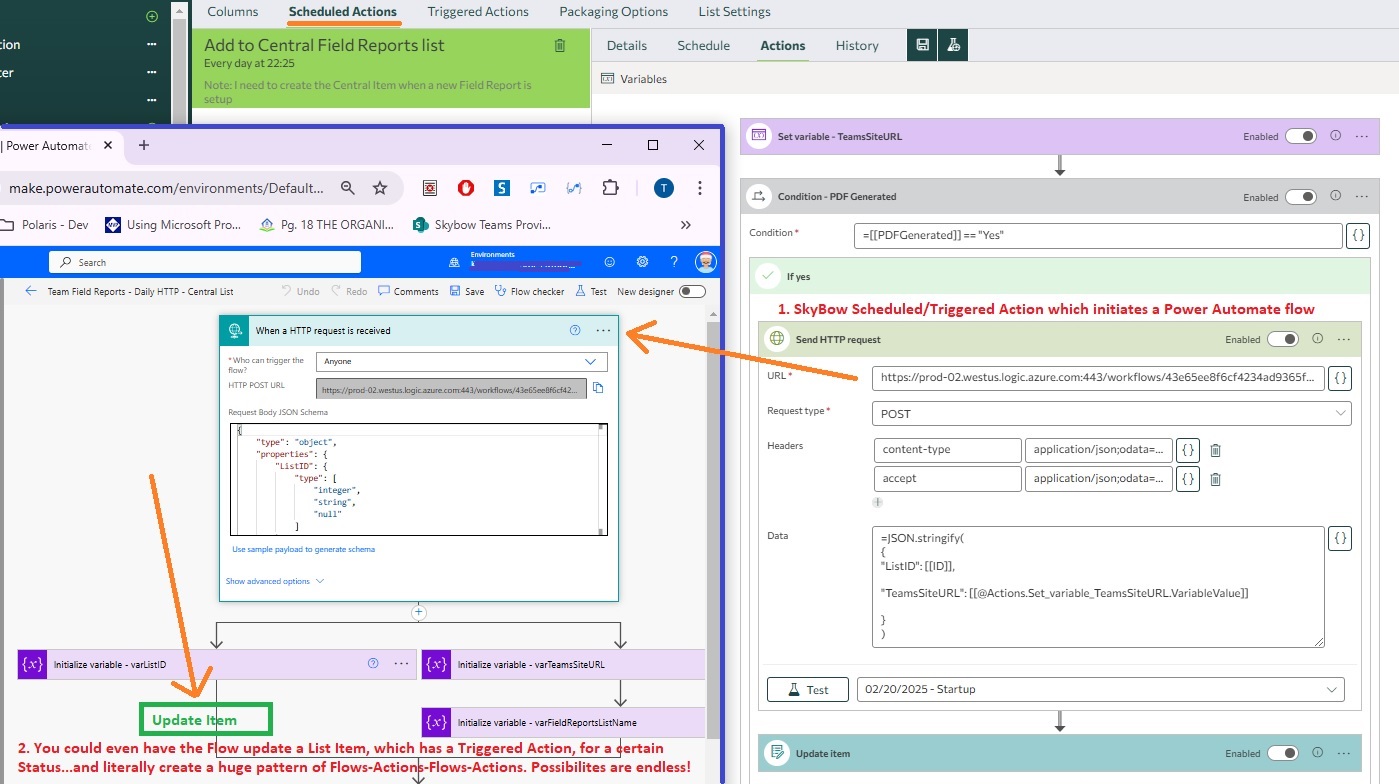
Using the HTTP Request action within a Triggered/Scheduled Action is the easiest way to initiate a Power Auto flow. (You can literally create seemingly endless patterns of Triggered Actions & Flows, triggering each other with Skybow.)
Here is a screenshot of a Scheduled Action with an HTTP Request (right side), which triggers a Power Automate flow (left side).
 2
2 -

Hello everybody,
many thanks for these insights.
The power automate flow basically collects attachments from a shared mailbox and creates files in a SharePoint library with a tiny approval by skybow. As we deploy the solution to different tenants, by now we transfer the according flow manually thus I was looking for a way to add it (or at least the exported template) to the skybow solution.
Best regards
0
Please sign in to leave a comment.
Comments
5 comments