SharePoint Lists with Barcodes - no barcode or value can be used in the form

Hello everybody,
I have a simple SPO list with enabled site feature for creating of barcodes and barcode values looking like this:
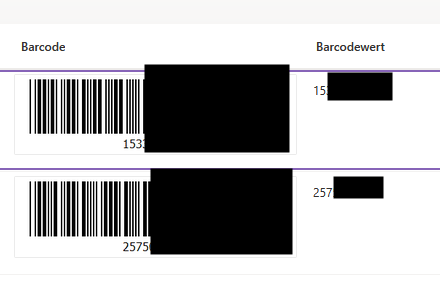
I cannot add both the picture and the value to the EditForm, where I need them for further proceeding. I tried adding the link to the item in a rich text control following these instructions with no success.
Thanks a lot for your advise.
Best regards
Aglika
-

Dear Aglika (ApoAssist),
for now this is not possible, but we will make those fields available in a future update.
Kind regards
Matthias
0 -
Thanks Matthias,
is there another way to get /_layouts/15/barcodeimagefromitem.aspx?ID=[[ID]]&list=my-list-guid displayed in the form?
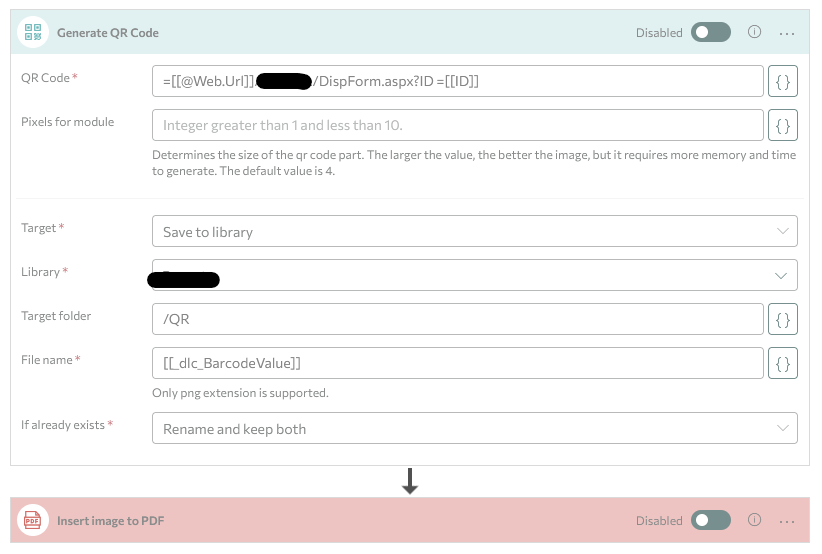
I have also tried to generate a QR code, but the trigger action fails whenever I try to store the it Base64 and insert the image to a *.pdf file or just try to save it to the library (thus both actions are disabled). Adding a file extension (*.png) to the name doesn't make any difference.
Any idea how to fix this?
Best regards
Aglika

 0
0 -

Hi Aglika (ApoAssist)
Were you able to solve your issue? If you need help you can book a session with us anytime here: skybow Solution Studio Online Expert Service0
Please sign in to leave a comment.
Comments
3 comments