GetFirstValueForQuery with local variable as CAML value

Hi,
The below:
var thisSample = [[@Functions.GetFirstValueForQuery('Lists/Measurements', '<View Scope="Recursive"><Query><Where><Eq><FieldRef Name="ID" /><Value Type="Number" ProviderType="Expression">[[=[[@Item.Id]]]]</Value></Eq></Where></Query></View>', 'Sample')]].LookupId;
var thisBatch = [[@Functions.GetFirstValueForQuery('Lists/Batches', '<View Scope="Recursive"><Query><Where><Eq><FieldRef Name="ID" /><Value Type="Number" ProviderType="Expression">' + thisSample + '</Value></Eq></Where></Query></View>', 'Title')]];
return thisBatch;
-

Hi Jens Munk
Local variables can't be used inside query functions due to the fact that all Expression evaluations will be executed as first step and in second step evaluated javascript code (including writing variable's values) is executed...
There are two ways to bring the output of your first query function into the second query function:- Just embed the first query function into to the second. Results in nested query functions where the inner function is evaluated first and after that the outer function.
- Check this Using a variable within a function placeholder - this way you store the result of the first query function in a window variable. Note that the writing part of the variable needs to be somewhere on an earlier Expression execution (e.g. Form Load Action or on an earlier executed field expression)
0 -
Okay. Thanks for the explanation.
I'll then need to embed a first query fct into a second, embedded into a third. How do I do that?
I'm working on a triggered action, so I don't have a window to put a var into, nor a Form Load Action.
0 -
Please let me know if this request is yet another one of those "That's not possible in Sharepoint" or if someone can help.
0 -
Ahh you configure it on a Triggered Action, there you have many more possibilities with the Action Builder
Configure 3 "Get items" actions instead of nested query functions. The result of the first action can be used as Action output in the next Get items action, and use the output of second Get items actions in the third Get items action (and so on...)0 -
Not sure how that might work ...
Ultimately I need the output to be the length of an array/list.
There's three lists in the game, A, B, C.
I look up in A using some clauses (GetFirstValueForQuery). If I find something, I go "up" and look up the item in B that links to A. Then go further "up" and look up in C the item that links to the one I found in B.
Using the item in C I go back "down" and find all items in B that are linked to from the item in C. For all those items in B I look up in A all items that are linked to from all those items in B. Then some filtering. Then I need the number of items found in A.
Please advise.
0 -
By using [[YourLookupField.YourTargetListsColum]] in combination with some Loop control actions you should be able to configure that use case with the Get items actions which returns the items into the loop where you can configure other actions per returned item e.g. another Get items action. This way you nest the queries by actions instead of query function expressions.
The number of returned items you can check with .length e.g. like this: =[[@Actions.Get_items.Items]].length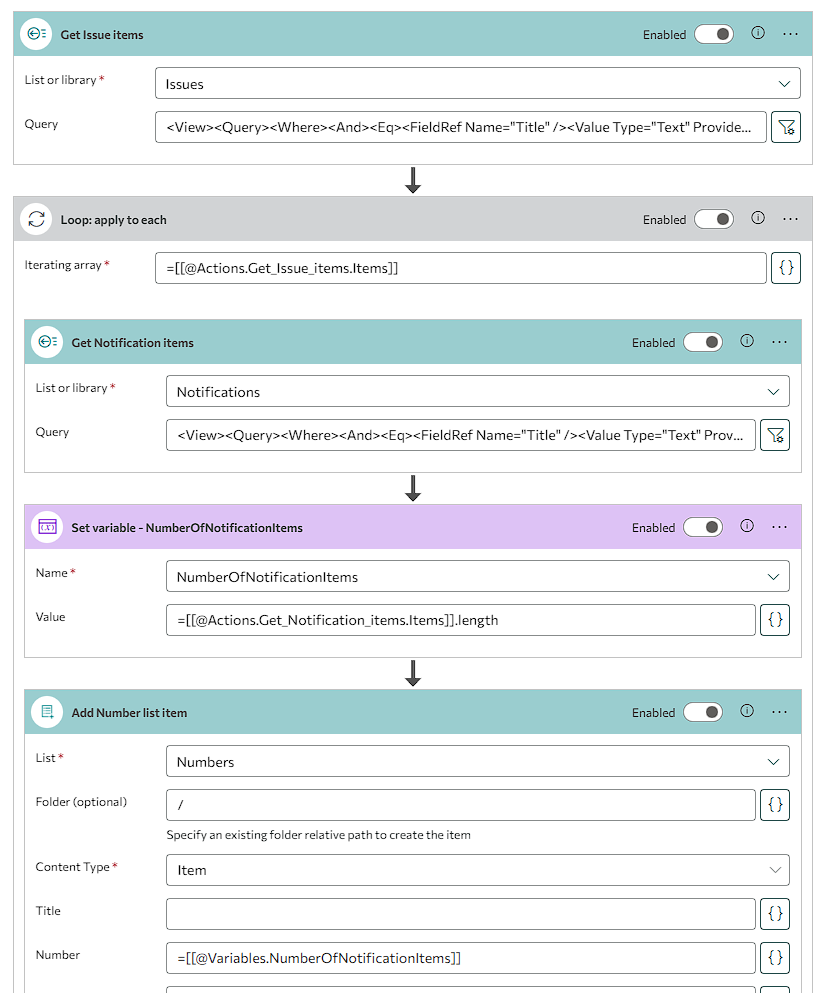 0
0 -
That looks clever. Trying that. Thank you.
How do I use "Set variable" to add an element to an array (which is the variable)? Can I do Var = Var + NewElement?
0 -
Yes, something like that.
You have to initialize the variable first to use the .push method on it (.push adds an object to the array):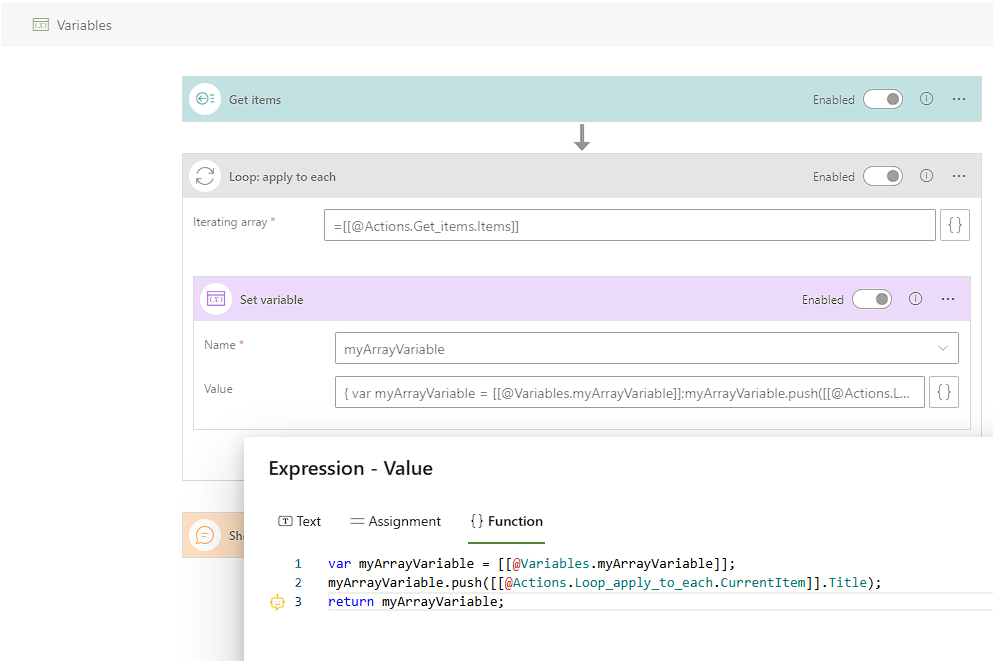
var myArrayVariable = [[@Variables.myArrayVariable]];
myArrayVariable.push([[@Actions.Loop_apply_to_each.CurrentItem]].Title);
return myArrayVariable;
In best case you initialize the Variable already as an array for consistent handling later, even if it should stay empty.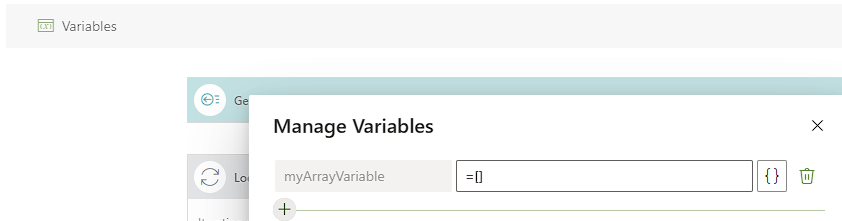 0
0 -
Thank you. Very nice!
I'm making good progress but have stumbled on a real problem.
https://my.skybow.com/hc/en-us/articles/4413479016082-Action-Update-item says "* In Scheduled/Triggered actions only adding item on the list from the current site is available."
So I can't update an item using a triggered action. So what do I do instead? Client side makes no sense.
0 -
Any suggestions?
0 -
The Update item action is limited to current site only in Triggered Actions due to cross-site permission issues.
You have to go the way by SharePoint REST API calls via Azure Active Directory App registration - there are samples in the web
For sure we can configure it for you in an expert session, just contact us the usual way0 -
... but I should be able to update an item on the current site? That's fine - but it doesn't seem to work.
Do you see any errors here? I've tried setting "Release status" to
- Ready
- "Ready"
- ="Ready"
- return "Ready";
No success.
 0
0 -
The expected value to set the "Release status" depends on it's column type.
E.g. if it's a lookup column you need to use the ID of the target element, not a text.
This should help finding the correct format related to different column types: Value formats of all column types – skybow Portal0 -
It's a Selection

Possible values:
- Not ready
- Ready
- Released
- Rejected
According to https://my.skybow.com/hc/en-us/articles/13077720484892-Value-formats-of-all-column-types
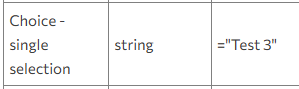
I should put in ="Ready".
Doesn't work. No error, just doesn't update the item.
0 -
Correct.
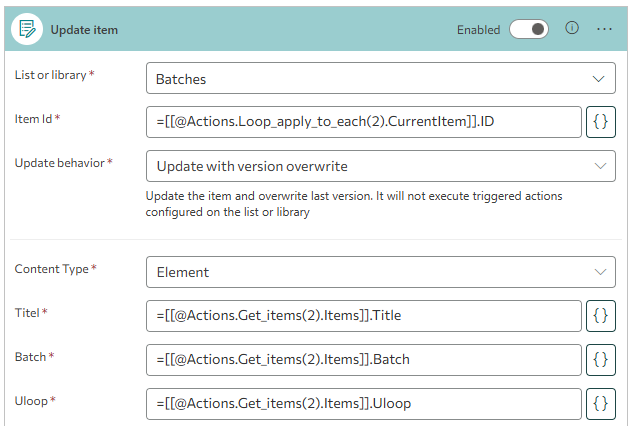
Therefore there must be an issue on another field's expression in your Update item action.And I think I can see one in the screenshot: =[[@Actions.Get_items(2).Items]].Title
This will not work. There is no Title value on an array of multiple items
If you want access the Title of the first item of that array, use =[[@Actions.Get_items(2).Items]][0].Title
If you want to perform some actions (e.g. Update item) per returned item in that array, you have to configure a Loop (action) and iterate on =[[@Actions.Get_items(2).Items]]0 -
Good point. My mistake. However,
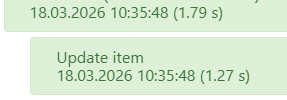
suggests that the item was successfully update. That's not the case.
Also, changing to
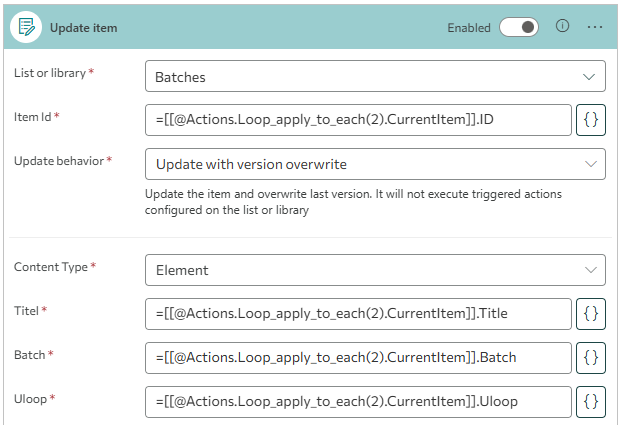
still doesn't work.
0 -
I made it work:
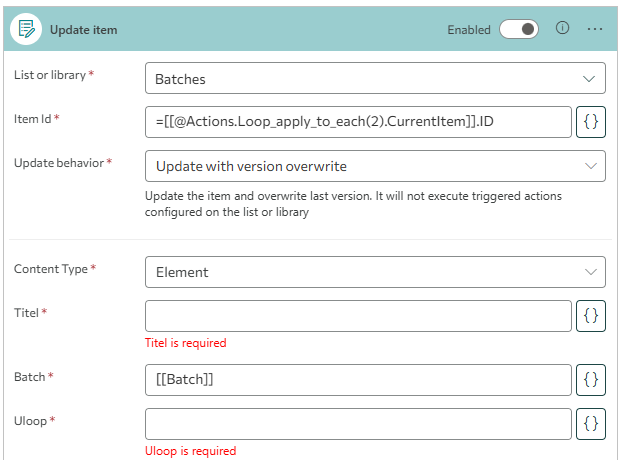
Apparently "required" is a soft term :)
Thanks for the help!
1
Please sign in to leave a comment.
Comments
17 comments