Images from Pages not deployed with solution

Hi,
I stumbled across following problem: I created a page, uploaded an image to display it in the banner. Then I packaged the solution and deployed it to another site. But the image is not deployed (it is stored in the site assets library) and on the page there is a placeholder displayed.
I tried to upload the image to the assets folder in Solution Studio, but I cannot choose from the hidden library when selecting an image.
Has anybody a solution to this or have I overseen something obvious?
Thank you,
Michael
-

Hi Michael
The Assets library of the solution in the Studio ("sbSolutionAssets" library) is actually the best place to store these images to include it into the solution for deployments, but since it's a hidden library it doesn't appear under "Site" when picking a file. Therefore you need to select "From a link" and paste in the copied link of the image stored in the sbSolutionAssets: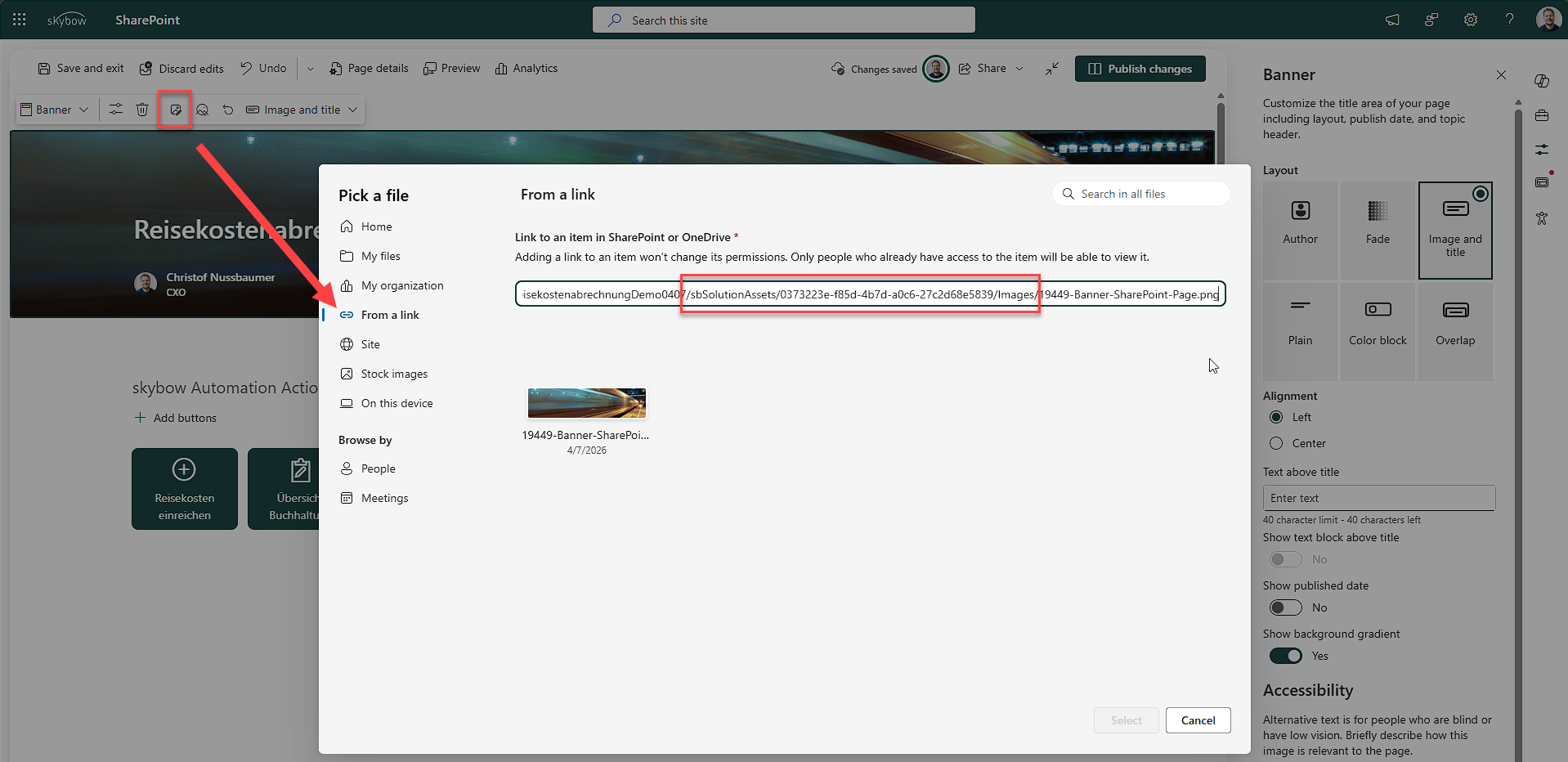 Hope this helps!0
 -
Thank you Christof! This was also my first idea, but the warning message about the permissions made me cancel this approach (since not all users have permissions to the development environment). Am I right that during the deployment the image src is replaced by the target site URL?
0 -
Yes, during deployment the image sources on pages will be automatically replaced by the new deployed image URL of the target site
1 -
Thank you!
1
Please sign in to leave a comment.
Comments
4 comments