Date() format in Expression Builder

Hi everyone
I've just started using Skybow Rich Forms Editor in SharePoint Online. On one of our forms we have a requirement where, when a user clicks a button, today's date is displayed in a text box. I've setup a rule and used the Date() function in the expression builder.
This works, but displays the date in the following format - Fri Jun 2 15:05:37 UTC+0100 2017
We need to display the short date i.e. 02/06/2017 or 2-Jun-2017 etc but I can't find any way of formatting the Date() function. Is this possible, and if so, how do I get this format?
Thanks in advance for your help.
-

Hi Gareth Jayne
Use this code:
var date = new Date();
return date.getDate() + "/" + date.getMonth() + "/" + date.getFullYear()like this:

Best Regards
Taras Lozynskyy
0 -
Thanks for the quick reply. This has formatted the date correctly but for some reason has come up as 2/5/2017 instead of 2/6/2017. Can you think of why this could have happened?
0 -
Hi Gareth Jayne, this is because month start from 0. Like here:
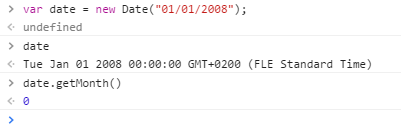
So just add +1 to the month:
var date = new Date();
return date.getDate() + "/" + date.getMonth() + 1 + "/" + date.getFullYear()0 -
Thank you so much for your help, that worked perfectly!
0
Please sign in to leave a comment.
Comments
4 comments