Displaying Taxonomy Data from a SubLibrary

I have the following script in a button link action which sends a formatted email and includes a list of associated documents:
var documentLinks = '<span style="font-size:1.8em;font-weight:400;color:#660033;">Business Entity | '+[[Entity]]+'</span><br><span style="font-size:1.4em;font-weight:400;color:#333;">Business Process | '+[[Department]]+'</span><br>Date | ' + [[MeetingDate]] +'<br><br>';
documentLinks += 'The documents are listed below are for the upcoming meeting on the '+[[Start_x0020_Time]]+'<br>Link to the documents <a href=\'https://intranet.ayaltis.com/sites/management/Pages/KeyDocsView.aspx?entity='+[[Entity]]+'&Department='+[[Department]]+'&TargetDate='+[[=([[Start_x0020_Time]].getFullYear()+'-'+([[Start_x0020_Time]].getMonth()+1)+'-'+([[Start_x0020_Time]].getDate()))]]+'\'>Meeting Documents List</a><br>Please review them.<br><br>';
var documents=[[@Site.QueryList('sites/management/KeyDocs','<Where><And><Eq><FieldRef Name=\'TargetDate\'></FieldRef><Value IncludeTimeValue=\'FALSE\' Type=\'DateTime\'>'+[[=([[Start_x0020_Time]].getFullYear()+'-'+([[Start_x0020_Time]].getMonth()+1)+'-'+([[Start_x0020_Time]].getDate()))]]+'</Value></Eq><Eq><FieldRef Name=\'Entity\' /><Value Type=\'TaxonomyFieldType\'>'+[[Entity]]+'</Value></Eq></And><And><Eq><FieldRef Name=\'Department12\' /><Value Type=\'Text\'>'+[[Department]]+'</Value></Eq></And><And><Neq><FieldRef Name=\'ApprovalStatus\' /><Value Type=\'ModStat\'>Draft</Value></Neq></And></Where>',100,'FileLeafRef,FileRef,Document_x0020_Type,Modified_x0020_By,Modified','Scope=\'Recursive\'')]];
var documentCount = documents.length;
documentLinks += '<table style="border: none;"><td>Type</td><td>Title</td><td>Modified</td><td>Modified By</td><td>Status</td>';

for (var i = 0; i < documentCount; i++) {
 documentLinks +='<tr style="background-color:#eee;"><td style="margin: 12px 2px 2px 2px;">'+ documents[i].Document_x00200_Type +'</td><td><a href="https://intranet.ayaltis.com' + documents[i].FileRef + '"> ' + documents[i].FileLeafRef + '</a></td><td>'+ documents[i].Modified +'</td><td>'+ documents[i].Modified_x0020_By +'</td><td>'+documents[i].ApprovalStatus+'</td></tr>';
}
documentLinks += '</table>';
documentLinks += '<br>Best regards<br><br>'+ [[@User.Title]];
return documentLinks;
The problem is that some of the columns in the list are Taxonomy fields (Managed Metadata columns) and the result is as follows:
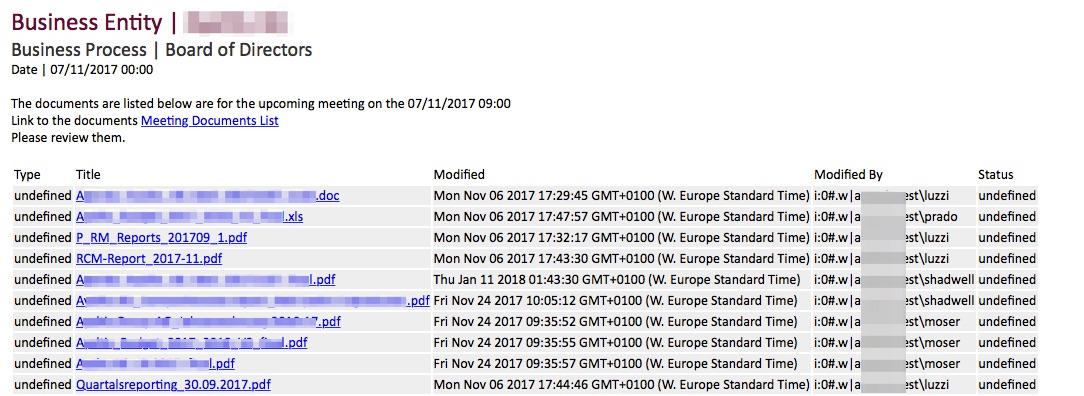
Type should return the "Document_x0020_Type" which can be Agenda, Minutes, etc.
Status should be Draft, Pending, Approved.
Modified By should have the users name i.e. Paul Shadwell and not the user's object name.
Modified should be a formatted date such as 06/11/2017
Any help to solve this would be greatly appreciated.
Best regards
Paul
-

Hi Paul Shadwell,
the document type had a typo in the rendering loop and the status was not listed in the view fields. Next to this I would use the standard "Editor" field for the "Modified By". Let's try with this one:
var documentLinks = '<span style="font-size:1.8em;font-weight:400;color:#660033;">Business Entity | '+[[Entity]]+'</span><br><span style="font-size:1.4em;font-weight:400;color:#333;">Business Process | '+[[Department]]+'</span><br>Date | ' + [[MeetingDate]] +'<br><br>';
documentLinks += 'The documents are listed below are for the upcoming meeting on the '+[[Start_x0020_Time]]+'<br>Link to the documents <a href=\'https://intranet.ayaltis.com/sites/management/Pages/KeyDocsView.aspx?entity='+[[Entity]]+'&Department='+[[Department]]+'&TargetDate='+[[=([[Start_x0020_Time]].getFullYear()+'-'+([[Start_x0020_Time]].getMonth()+1)+'-'+([[Start_x0020_Time]].getDate()))]]+'\'>Meeting Documents List</a><br>Please review them.<br><br>';
var documents=[[@Site.QueryList('sites/management/KeyDocs','<Where><And><Eq><FieldRef Name=\'TargetDate\'></FieldRef><Value IncludeTimeValue=\'FALSE\' Type=\'DateTime\'>'+[[=([[Start_x0020_Time]].getFullYear()+'-'+([[Start_x0020_Time]].getMonth()+1)+'-'+([[Start_x0020_Time]].getDate()))]]+'</Value></Eq><Eq><FieldRef Name=\'Entity\' /><Value Type=\'TaxonomyFieldType\'>'+[[Entity]]+'</Value></Eq></And><And><Eq><FieldRef Name=\'Department12\' /><Value Type=\'Text\'>'+[[Department]]+'</Value></Eq></And><And><Neq><FieldRef Name=\'ApprovalStatus\' /><Value Type=\'ModStat\'>Draft</Value></Neq></And></Where>',100,'FileLeafRef,FileRef,Document_x0020_Type,Editor,Modified,ApprovalStatus','Scope=\'Recursive\'')]];
var documentCount = documents.length;
documentLinks += '<table style="border: none;"><td>Type</td><td>Title</td><td>Modified</td><td>Modified By</td><td>Status</td>';
for (var i = 0; i < documentCount; i++) {
 documentLinks +='<tr style="background-color:#eee;"><td style="margin: 12px 2px 2px 2px;">'+ documents[i].Document_x0020_Type +'</td><td><a href="https://intranet.ayaltis.com' + documents[i].FileRef + '"> ' + documents[i].FileLeafRef + '</a></td><td>'+ documents[i].Modified +'</td><td>'+ documents[i].Editor[Object.keys(documents[i].Editor)[1]] +'</td><td>'+documents[i].ApprovalStatus+'</td></tr>';
}
documentLinks += '</table>';
documentLinks += '<br>Best regards<br><br>'+ [[@User.Title]];
return documentLinks;
Cheers Matthias
0 -
Thanks Matthias, this helped, partially. Idiscovoured that ApprovalStatus doesn't work but _moderationStatus does and returns the status ID. So with a bit of googling I was able to resolve the ID to text. I've included the code here in case it's helpful to others. I have also fixed the Date time column and thanks to you Editor works better than Modified By.
Just one more issue: "Type"is a Managed Metadata column called Document_x0020_Type. How do I resolve this and return the text (not the ID) of the correct Document Type? As you can see in the screenshot it is undefined.vardocumentLinks='<span style="font-size:1.8em;font-weight:400;color:#660033;">Business Entity | '+[[Entity]]+'</span><br><span style="font-size:1.4em;font-weight:400;color:#333;">Business Process | '+[[Department]]+'</span><br>Date | '+ [[MeetingDate]] +'<br><br>';documentLinks+='The documents are listed below are for the upcoming meeting on the '+[[Start_x0020_Time]]+'<br>Link to the documents <a href=\'https://intranet.ayaltis.com/sites/management/Pages/KeyDocsView.aspx?entity='+[[Entity]]+'&Department='+[[Department]]+'&TargetDate='+[[=([[Start_x0020_Time]].getFullYear()+'-'+([[Start_x0020_Time]].getMonth()+1)+'-'+([[Start_x0020_Time]].getDate()))]]+'\'>Meeting Documents List</a><br>Please review them.<br><br>';vardocuments=[[@Site.QueryList('sites/management/KeyDocs','<Where><And><Eq><FieldRef Name=\'TargetDate\'></FieldRef><Value IncludeTimeValue=\'FALSE\' Type=\'DateTime\'>'+[[=([[Start_x0020_Time]].getFullYear()+'-'+([[Start_x0020_Time]].getMonth()+1)+'-'+([[Start_x0020_Time]].getDate()))]]+'</Value></Eq><Eq><FieldRef Name=\'Entity\' /><Value Type=\'TaxonomyFieldType\'>'+[[Entity]]+'</Value></Eq></And><And><Eq><FieldRef Name=\'Department12\' /><Value Type=\'Text\'>'+[[Department]]+'</Value></Eq></And><And><Neq><FieldRef Name=\'ApprovalStatus\' /><Value Type=\'ModStat\'>Draft</Value></Neq></And></Where>',100,'FileLeafRef,FileRef,Document_x0020_Type,Editor,Modified,_ModerationStatus','Scope=\'Recursive\'')]];vardocumentCount=documents.length;documentLinks+='<table style="border: none;"><td>Type</td><td>Title</td><td>Modified</td><td>Modified By</td><td>Status</td>';
for (vari=0; i<documentCount; i++) {varmoderationStatusType= [ "Approved", "Denied", "Pending", "Draft", "Scheduled" ];varmodStatAsNumber=0;varmodStatAsText=moderationStatusType[documents[i]._ModerationStatus];documentLinks+='<tr style="background-color:#eee;"><td style="margin: 12px 2px 2px 2px;">'+documents[i].Document_x00200_Type+'</td><td><a href="https://intranet.ayaltis.com'+documents[i].FileRef+'"> '+documents[i].FileLeafRef+'</a></td><td>'+('0'+(documents[i].Modified.getDate())).slice(-2)+'/'+('0'+(documents[i].Modified.getMonth()+1)).slice(-2)+'/'+documents[i].Modified.getFullYear()+' '+('0'+(documents[i].Modified.getHours())).slice(-2)+':'+('0'+(documents[i].Modified.getMinutes())).slice(-2) +'</td><td>'+documents[i].Editor[Object.keys(documents[i].Editor)[1]] +'</td><td>'+modStatAsText+'</td></tr>';}documentLinks+='</table>';documentLinks+='<br>Best regards<br><br>'+ [[@User.Title]];returndocumentLinks;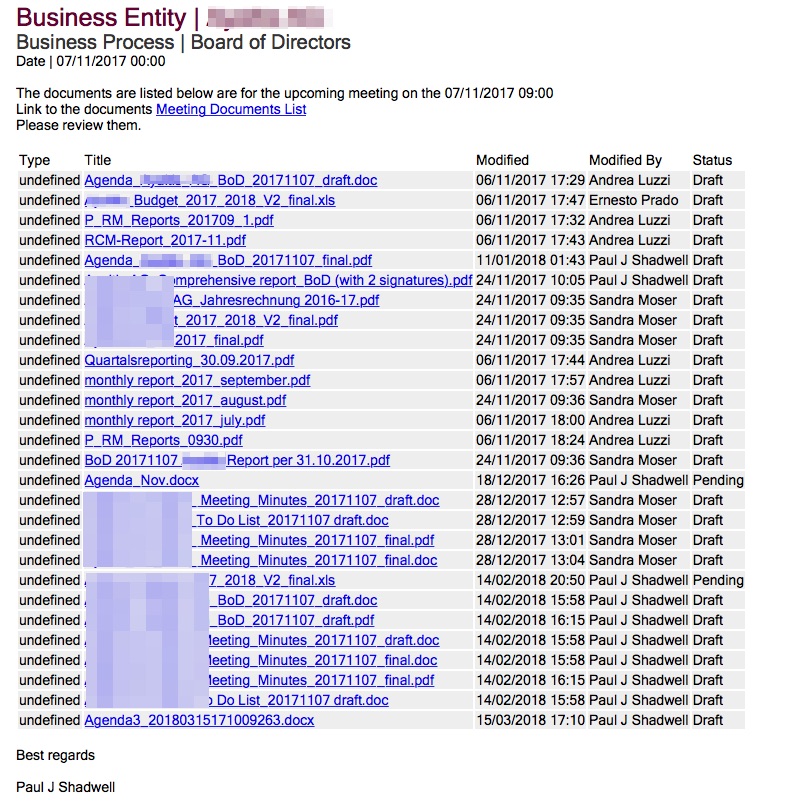 0
0 -
I found the answer myself. Using the 'Object.keys' solution you provided I thought I would try it on Document_x0020_Type. (and yes I did spot the typo in my code x00200 should be x0020).
So I replaced:
'documents[i].Document_x0020_Type'with
'documents[i].Document_x0020_Type[Object.keys(documents[i].Document_x0020_Type)[0]]'
A bit of trial and error changing the [0] at the end got me to what I needed:
[0] = Text String of Managed Metadata object.
[1] = GUID of the object.[2] = ID of the object.
Thankyou very much for your help. It pointed me in the right direction.
So the end results looks like this.
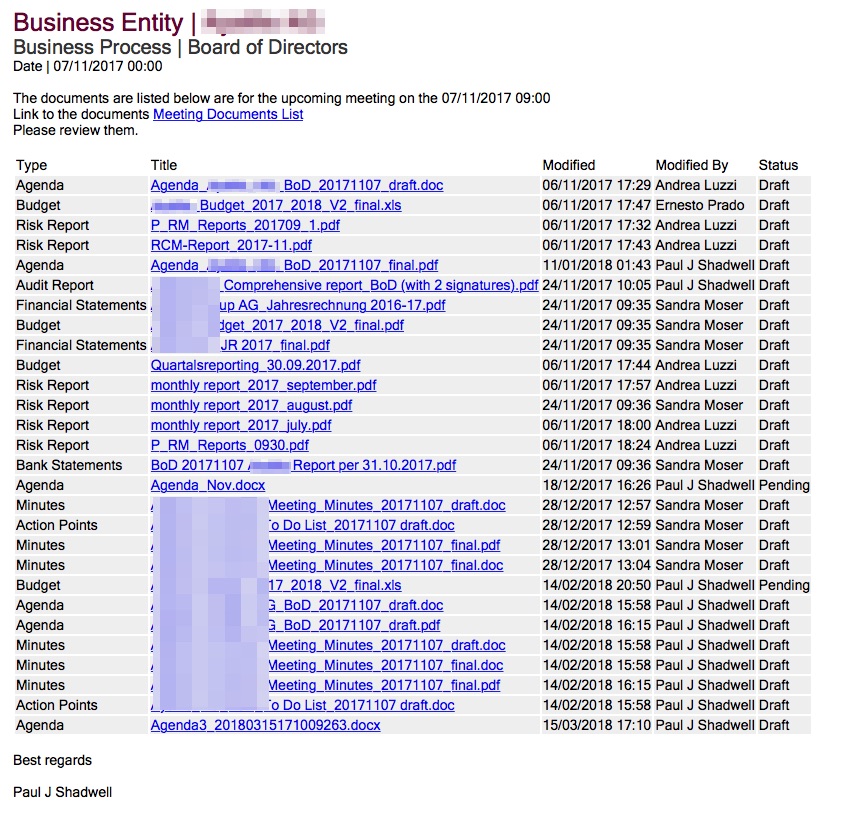
Now I will focus on getting the table looking how the user wants it.
0 -
Great, thanks for the feedback and sharing the solution.
Best
Matthias
0
Please sign in to leave a comment.
Comments
4 comments