Run workflow against item in sublibrary

Hi everyone
I have a form setup that is being used to to manage credit card transactions. This form contains a related sublibrary which is used to upload receipts for items ordered and metadata is set on these receipts. The value of the items in the sublibrary are then used to calculate the overall total for the master summary list item.
I have created a custom workflow to be used if a user wants to remove one of the items attached to the sublibrary. i can't use the standard delete function as before deleting the item its value needs to be removed from the total expenditure.
As you can see from the image below I have created a link labelled Remove Item and ideally I would like to fire the workflow when this item is clicked. However, I can't see a way of passing the ID of the selected item in the sublibrary to the workflow.
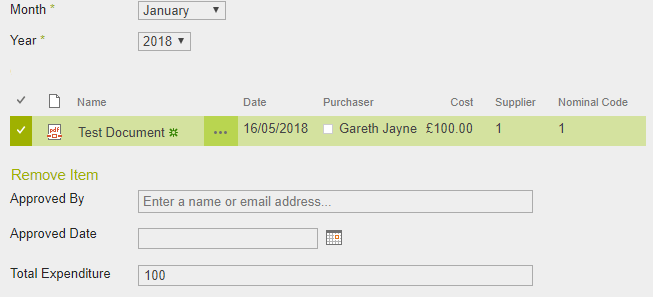
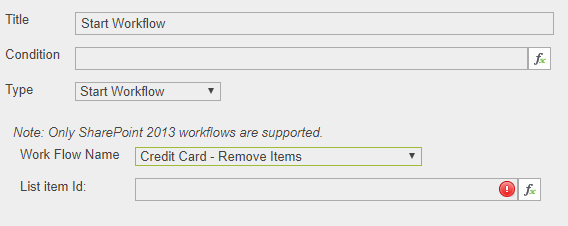
Is this possible? A possible workaround would be for me to create a custom action for the list item menu on the sublibrary but this takes the user to a new tab when the workflow runs rather than the workflow running in the background.
Any advice would be gratefully received.
-

Hi Gareth Jayne
With this javascript code you get the current selected items in a list view:
SP.ListOperation.Selection.getSelectedItems()
I don't know the exact handling of it, when more than one list view is on your form...
With this code you get the id of the first selected item:
SP.ListOperation.Selection.getSelectedItems()[0].id
You have to handle anyway the non-selection and the more-than-one-selected-item case.
Another idea is getting the selected row by the css class .s4-itm-selected:
var idAttr = ArdeviaJQuery(".s4-itm-selected").attr("id");
return idAttr.split(",")[1];But first approach seems to be a more pretty solution.
0
Please sign in to leave a comment.
Comments
1 comment