Displaying Columns from Lookup Lists - How do I display additional columns from a lookup list

Original Post by Sandy (Imported from Ardevia Forum)
Hi,
Hope you can help me.....
I have a list called Customers that has 4 columns on it:
Name; Contact Name; Account Number; Email.
I have a second list called Orders that has a lookup column titled CustomerName that does a Lookup on the Customers list using the Name on that List.
I have also selected to include the Contact Name, Account Number and Email on my Orders list which I selected at the time I created the lookup column on the Orders list.
What I am trying to achieve here is that if someone partially enters a Customer Name, selection will be allowed of an existing Customers list item, this should then display the Account Number, Contact and Email Address into the Orders Sublist on the form for verification purposes. How is this achieved?
Thanks
Sandy
-
Original Post by Liliia (Imported from Ardevia Forum)
Hi Sandy,
Could you provide more information about what form you want to add the Orders Sublist to, and where a user enters a Customer Name (which form and list)? Adding some screenshots would be helpful.
0 -
Original Post by Sandy (Imported from Ardevia Forum)
Hi Liliia,
The 3 lists are as follows, excluding any columns that have no effect on the form.
Customer
- Name
- Account Number
- Address
- Contact
- EmailInvoice
this has a sub-list of Invoice Line that is connected via the Id of the Invoice
- IDInvoice Line
- Customer Name (Lookup to Name on Customer)
- Account Number
- Address
- Contact
- Email
- InvoiceID (linked to Invoice ID on Invoice ListThe Add New form is associated with the Invoice list which has the Invoice Line as a sublist on it. In the Invoice Line Sublist, the user enters a customer name which does a lookup to the Customer List. Once this is selected, I would like the Account Number, Address, Contact and Email to all be defaulted in to the Invoice Line as the values that are currently stored in the Customer List, It is only for validation purposes and the Account Number used for export at some later date.
Just on this, when a Sub List is inserted ,how is this restyled so that the data can spread over two rows instead of the single row provided currently. Ideally I would like the validation information to appear on the second line.
Thanks Sandy
0 -
Original Post by Liliia (Imported from Ardevia Forum)
Hi Sandy,
There are two cases possible:
Case 1. Add Calculated expressions on sub-list columns, e.g. for Contact (change CustomerName on appropriate field name):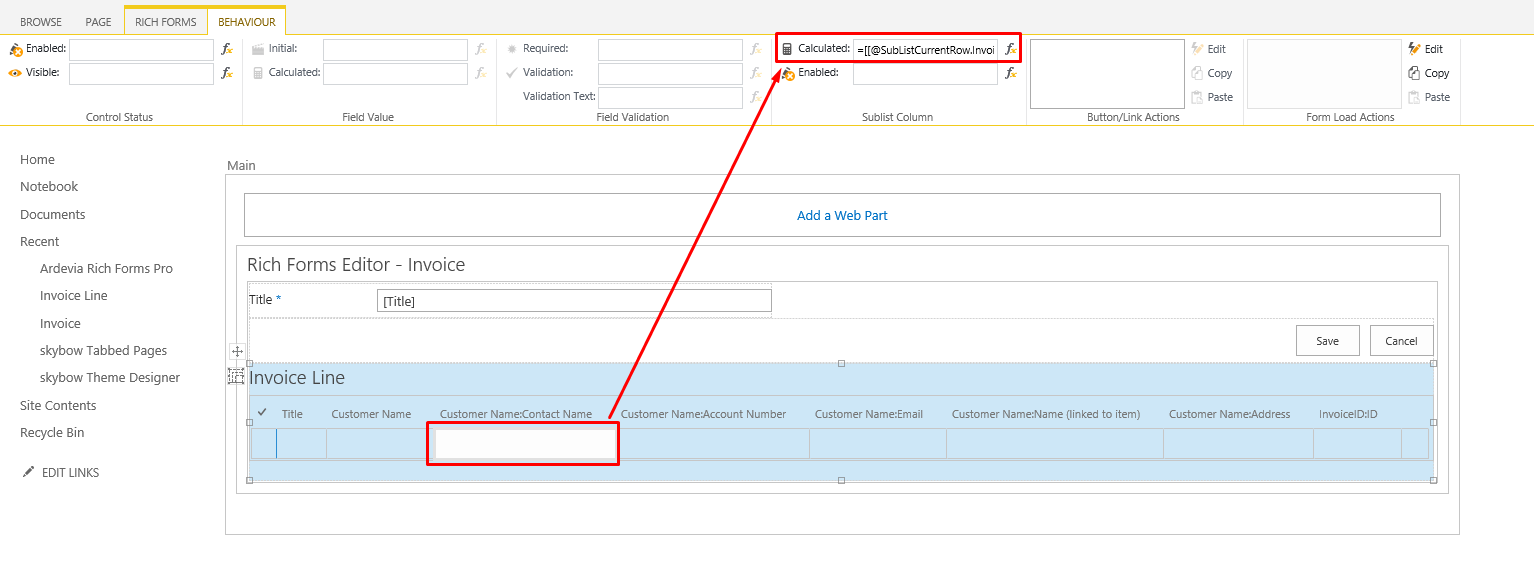
Code:
=[[@SubListCurrentRow.Invoice_Line.Customer_x0020_Name]] ? [[@Web.GetFirstValueForQuery('Customers',
 '<Where><Eq><FieldRef Name="CustomerName" /><Value Type="Text">
[[@SubListCurrentRow.Invoice_Line.Customer_x0020_Name]]</Value></Eq></Where>', 'Contact_x0020_Name')]]:''
But there is a validation error on saving form since Rich Forms do not support editing lookup additional fields yet. Please watch this File “Screencast 2015-12-04.mp4” .
We can write a script for you on Save button which clears all read-only fields before saving, but for this please contact us with using our Support .Case 2. Add custom Account Number, Address, Contact, and Email fields to 'Invoice Line' list in List Settings instead of Customer lookup additional fields:

Add the Invoice Line sub-list on the New Form of Invoice (for updating the view). Then add the Calculated expressions for Contact, Account Number, Address and Email fields as in case 1 and set 'Enabled' expression to "false".
Once a customer is selected, currently stored values will be shown within the sub-list and will be saved after clicking Save button on the form.
Please watch File “Screencast 15-58 04-12-2015.mp4”Hope this will help.
0 -
Original Post by Sandy (Imported from Ardevia Forum)
Hi,
I tried this with trying to retrieve the Contact from the Customers list and received multiple errors.
Just to confirm for the columns that relate to this expression only...
Customer List columns
Name (Name of Customer)
Contact (Name of Contact)Invoice Line columns
Customer Name
ContactGiven the formula supplied above, can you please advise which column is to appear where in the formula.
The errors I am getting are as follows:
Expected an identifier and instead saw '@'
Expected ']' to match '[' from line 1 and instead saw 'SublistCurrentRow'
Missing semicolon
Expected and identifier and instead saw ']'
Expected ':' and instead saw ';'
Expected an identifier and instead saw '}'Thanks
Sandy0 -
Original Post by Sandy (Imported from Ardevia Forum)
Hi,
Just to add to this, can we make the Contact column in the Invoice Line columns, the Contact Name column so that it is easier to tell the difference.
Thank You
S0 -
Original Post by Andrii Katsiubka (Imported from Ardevia Forum)
Hi,
I tried this with trying to retrieve the Contact from the Customers list and received multiple errors.
Just to confirm for the columns that relate to this expression only...
Customer List columns
Name (Name of Customer)
Contact (Name of Contact)Invoice Line columns
Customer Name
ContactGiven the formula supplied above, can you please advise which column is to appear where in the formula.
The errors I am getting are as follows:
Expected an identifier and instead saw '@'
Expected ']' to match '[' from line 1 and instead saw 'SublistCurrentRow'
Missing semicolon
Expected and identifier and instead saw ']'
Expected ':' and instead saw ';'
Expected an identifier and instead saw '}'Thanks
SandyIn expression
Code:
[[@SubListCurrentRow.Invoice_Line.Customer_x0020_Name]] ? [[@Web.GetFirstValueForQuery('Customers', '<Where><Eq><FieldRef Name="CustomerName" /><Value Type="Text"> [[@SubListCurrentRow.Invoice_Line.Customer_x0020_Name]]</Value></Eq></Where>', 'Contact_x0020_Name')]]:''- @SubListCurrentRow.Invoice_Line.Customer_x0020_Name - its a lookup to Customer List in Invoice list
- 'Customers' - name of Customers list
- "CustomerName" - its Name (Name of Customer)
- 'Contact_x0020_Name' - its Contact (Name of Contact)
0
Please sign in to leave a comment.
Comments
6 comments