Extracting values from other lists

I have a form that I have created that has a primary list and a sublist. From the information entered in the sublist I need to determine which executive group and approver are required to approve this form. In the sublist I have multiple lines with -ve and +ve values, the lines are only ever spread across one giving executive group and one receiving executive group, so I thought I could get the group of the lowest value amount (giving) and the group of the highest value amount (receiving) based on the business unit associated with the two lines, however the CAML query I have created is not working and I don't get a value returned.
The relevant columns in the sublist NPFRDetails are as follows:
Amount
Management Unit - lookup to Management Unit Ref list
Executive Group - related executive group is also available in this list
This is the CAML query as follows:
window.givingGroup = [[@Web.GetFirstValueForQuery('NPFRDETAILS','<Query><Where><Eq><FieldRef Name="NFRID" /><Value Type="Text">[[ID]]</Value></Where></Eq><OrderBy><FieldRef Name="Amount" Ascending=True /><Value Type="Number">[[@SubLists.NPFRDetails.Amount]]</Value></OrderBy></Query>', 'Management_x0020_Unit_x003a_Exec')]];
Once I get the Executive Group, I then need to query another list to get the approver for the Executive Group, so using the string value I get returned from above, I then need to query a Delegate list to get the first active approver for the Executive Group and update the person / group field on the primary list.
CAML query is as follows:
window.givingApprover = [[@Web.GetFirstValueForQuery('Delegations','<Query><Where><And><And><And><Eq><FieldRef Name="Group" /><Value Type="Text">window.givingGroup</Value></Eq></And><Geq><FieldRef Name="EffectiveFrom" /><Value Type="Date">today</Value></Geq></And><Leq><FieldRef Name="EffectiveTo" /><Value Type="Date">today</Value></Leq></And></Where></Query>', 'Delegate')]];
Any assistance provided would be appreciated.
Sandy
-

Hi Sandra Huntley,
the problem in this case will be, that the items from the NPFRDetails list are not yet saved especially on the newform, they are only in the grid before you save the form.
To get the smallest and the largest number from a sublist, you can use an expression:
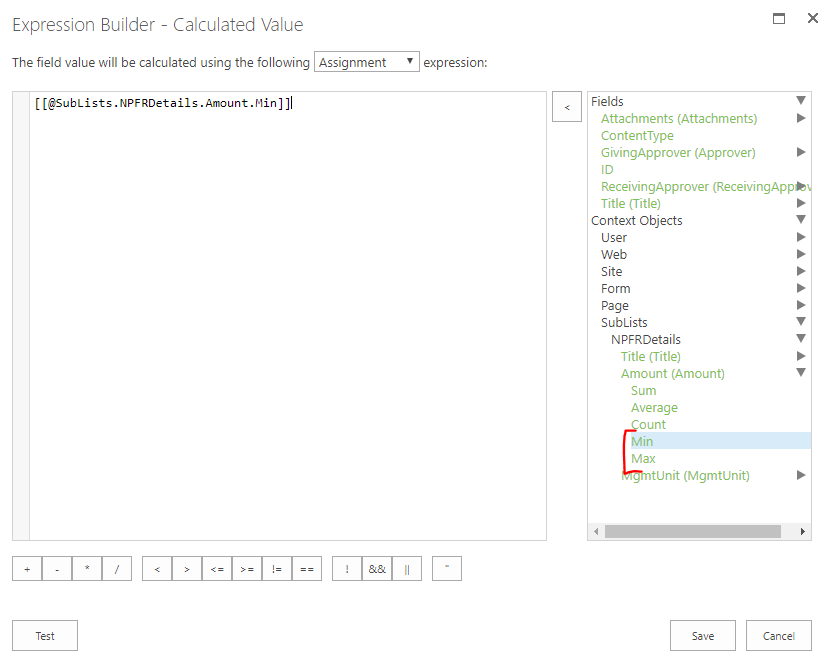
Where do you try to execute this query? I think the best would be to use it in a calculated expression on the giving/receiving executive fields in the primary list.
BR Matthias
0 -
Hi Matthias,
Sorry, I don’t think that I explained the issue very well.
The steps that I am try to work through are as follows:
I need to find the Management Unit for the NPFRDetail line that has the lowest value. With this Management Unit I need to query the REF-MANAGEMENT UNIT list to find the Executive Group code.
I then need to find the Management Unit for the NPFRDetail line that has the highest value. With this Management Unit I need to query the REF-MANAGEMENT UNIT list to find the Executive Group code.
Normally I would have had the Executive Group included as part of the Management Unit Lookup Column, but I need to add a record to balance so don’t have this information available.
0 -

Hi Sandra Huntley,
I think it is possible to do with nested expressions.
I will try to recreate your case and write a solution for it.0 -
Unfortunalty nested expression for @Web.GetFirstValueForQuery will be in next release, so at the moment the solution will be without using that placeholder.
Suppose on the form we have sublist NPFRDetail.
NPFRDetail has fields:
- Amount (Number field)
- ManagementUnitRef (Lookup to ManagementUnit list)
ManagementUnit has fields:
- Title
- ExecutiveGroupCode
So we need to find ExecutiveGroupCode for list item from NPFRDetail sublist with min Amount.
The next expression can do it:
var webpartId = "NPFRDetail webpart id";
var webpartSelector = "[ard-webpart-id=" + webpartId + "]";
var gridController = jQuery(webpartSelector).data("Controller");
var grid = gridController.InstanseData;
var recordsIds = grid.GetAllRecordIds();

var min = [[@SubLists.NPFRDetail.Amount.Min]];
var lookupId = 0;

for (var i = 0; i < recordsIds.length; i++){
   var id =  recordsIds[i];
   var unit = grid.GetRowValue(id, "ManagementUnitRef");
   var amount = grid.GetRowValue(id, "Amount");
   if (parseFloat(amount) == min){
     if(unit instanceof Array && unit[0]){
      lookupId = unit[0].lookupId;
     } else {
      lookupId = unit ? unit.split(";#")[0] : unit;
     }
      break;
   }
}

var ctx = new SP.ClientContext();
var list = ctx.get_web().get_lists().getByTitle("ManagementUnit");
var item = list.getItemById(lookupId);
ctx.load(item);
ctx.executeQueryAsync(function(){
  var group = item.get_fieldValues()['ExecutiveGroupCode'];
  alert(group);
}, function(e,s){
});
On the place "NPFRDetail webpart id" should be the webpart id of NPFRDetail sublist
To find executive group code you can use the same expression with one small change:- replace Min by Max in [[@SubLists.NPFRDetail.Amount.Min]].
0 -
Hi Andrii,
This is what I used in the Execute Script and received no results. The line
that starts with var ctx shows as an error with SP as not being defined.
var webpartId = "3ef1d749-d70e-4bf0-b5d9-6a5d870917a7";
var webpartSelector = "[ard-webpart-id=" + webpartId + "]";
var gridController = jQuery(webpartSelector).data("Controller");
var grid = gridController.InstanseData;
var recordsIds = grid.GetAllRecordIds();
var min = [[@SubLists.NPFRDetails.Amount.Min]];
var lookupId = 0;for (var i = 0; i < recordsIds.length; i++){
var id = recordsIds[i]; alert("id = " + id);alert("sam");
var unit = grid.GetRowValue(id, "ManagementUnit");
var amount = grid.GetRowValue(id, "Amount");
if (parseFloat(amount) == min){
if(unit instanceof Array && unit[0]){
lookupId = unit[0].lookupId;
} else {
lookupId = unit ? unit.split(";#")[0] : unit;
}
break;
}
}
var ctx = new SP.ClientContext();
var list = ctx.get_web().get_lists().getByTitle("ManagementUnit");
var item = list.getItemById(lookupId);
ctx.load(item);
ctx.executeQueryAsync(function(){
var group = item.get_fieldValues()['ExecutiveGroup'];
alert(group);
}, function(e,s){
});RegardsSandy0 -
Try to replace var ctx = new SP.ClientContext(); with var ctx = new window.SP.ClientContext();
0
Please sign in to leave a comment.
Comments
6 comments