Sum of SubList not working

Using the following formula to sum a sub-list field:
if ([[@SubLists.Expense_Details.ApprovedAmount1.Sum]]!== 0)
return [[@SubLists.Expense_Details.ApprovedAmount1.Sum]];
else return 0;
for some reason it recently stopped working after no issues in the last 2 years. Any assistance would be appreciated
-

Hi Ken Dominguez,
what version of Rich Forms do you have installed?
Is there an error message visible or what is the behavior?
If you open the developer tools from your browser (pressing F12) is there a javascript error? If so, can you please send a screenshot?
Thanks
BR Matthias
0 -
ver 3.1.18.5
after marking a sublist item as "approved", calculation comes back as NaN.
You can make it show the total for 1 list item if you approve 2 or more, then un-approve all except 1 item
There are some errors on the page, but they seem to appear on all pages:
- HTTP404: NOT FOUND - The server has not found anything matching the requested URI (Uniform Resource Identifier). (XHR)GET - https://503ff.sharepoint.com/siteassets/kwizcom/aplfe/420c0cdd-8085-4e3a-aef2-22574b1efb50.js?ver=1524620128424
- HTTP404: NOT FOUND - The server has not found anything matching the requested URI (Uniform Resource Identifier). (XHR)GET - https://503ff.sharepoint.com/siteassets/kwizcom/aplfe/d7d768b0-5bdc-4dbf-9974-ab620ae8ba2d.js?ver=1524620135807
- SCRIPT5007: Unable to get property 'TopLevelElementId' of undefined or null reference
0 -
Hi Ken Dominguez,
how do you mark a sublist item as "approved"? Can you please send a screenshot of you configuration?
Cheers Matthias
0 -
Sorry, didn't notice that the screen shot didn't post. Here it is again, you change the "Approved" field to yes, which then applies the item total to the Amount Due:
0 -
 0
0 -
Hi Ken Dominguez,
I've tried to reproduce it, but it seems to work on my environment at least with version 3.1.27.7
I was not sure where you have the expression from your initial question. Let me show you how I configured it:
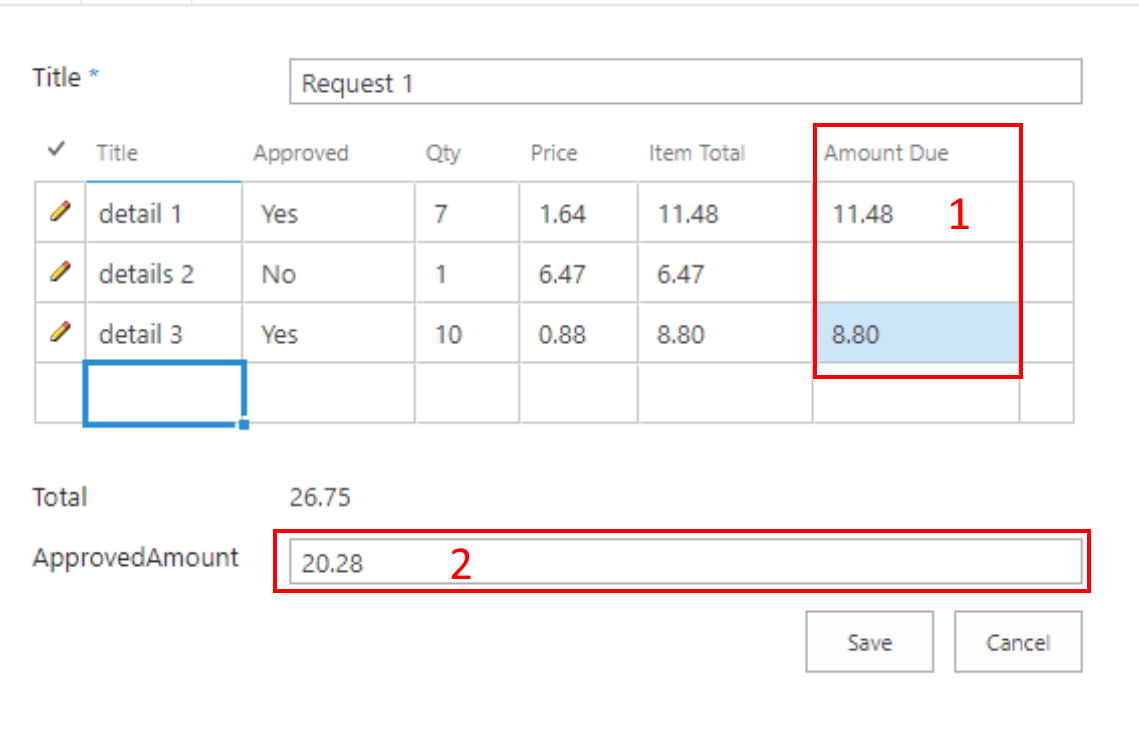
1 => Calculated Sublist Column:
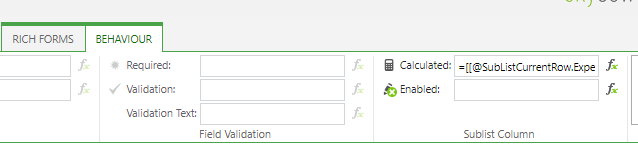
[[@SubListCurrentRow.ExpenseDetails.Approved]]?[[@SubListCurrentRow.ExpenseDetails.Qty]]*[[@SubListCurrentRow.ExpenseDetails.Price]]:0
2 => Calculated Field Value:

[[@SubLists.ExpenseDetails.ApprovedAmount.Sum]]
I think this should work for you as well with your version. Can you please try it like this or was my understanding of your requirements wrong?
Regards Matthias
0 -
Yes, very similar to what I had except I had the list field for amount due as a SharePoint calculated column. I changed it to a number field and did the calculation in the sublist as you did... and that fixed the issue. Thanks a bunch!
0
Please sign in to leave a comment.
Comments
7 comments