Automation Actions (webpart) - Open Form/Webpage in Modals (iFrame Panel/Dialog)

(This ideal could potentially apply across Skybow, but the initial thought that hit me concerned the Automation Actions webpart.)
Basically, add the ability to open: Forms, ListViews & Websites, using the IFrameDialog or IFramePanel controls, with the ability to choose panel size.
Here is an example of a webpart I found that does something similar... It opens prop-pane configured links in a Large Panel.
Site Page

Post Button Click

-

Actually is the possibility to open forms in panel already in place as an action which can be placed on pages, forms and list views: Open form in panel with defined panel size
For presenting lists in a panel you can place the list on a form and open that form as a workaround.
To open site pages in a panel is no known solution available afaik... probably the Open in options of Open web page action could be extended in future to open in Panel (same as for Open forms action)0 -
Christof
Greetings,
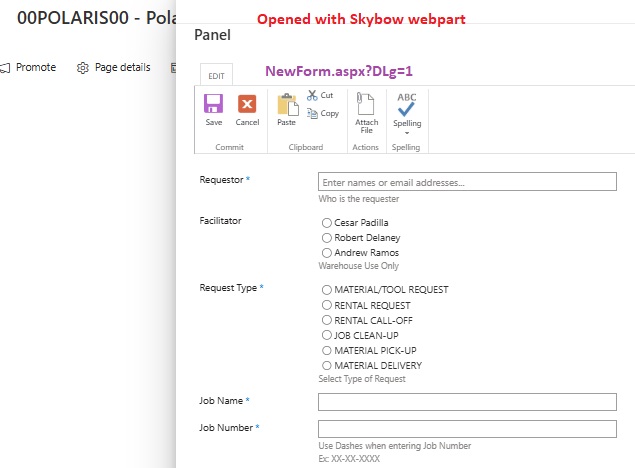
This ideal was released in the most recent update. I just tested it and noticed that for some reason it is appending ?DLg=1 to the URL...which, depending on the context, opens SharePoint objects in a Classic form.
3 screenshots below... I have a site page setup with the Skybow Webpart and a webpart I built that uses the IFramePanel control. Both are configured the exact same. The Skybow version appends the DLg query string.

---
---
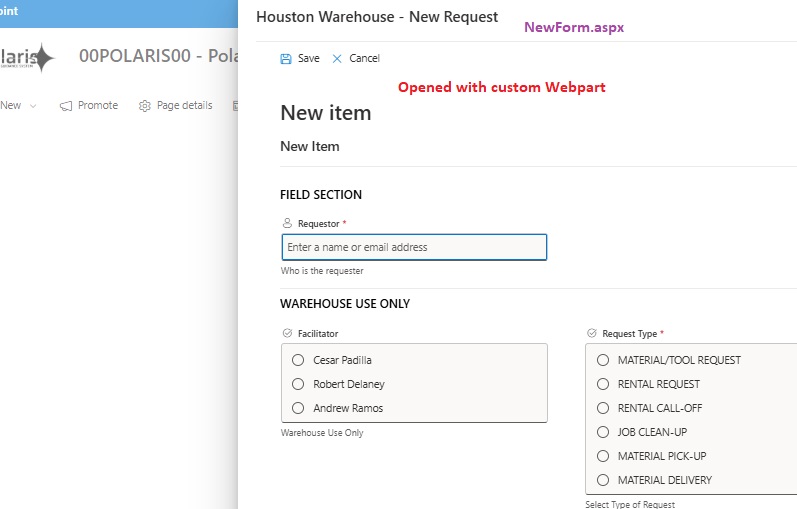
Is this the expected behavior?
0 -

Hi,
We’ve been able to reproduce this behavior when opening a non-customized form in a panel using the Open web page action. Could you please confirm if you’re experiencing the same scenario?
We’ve released an improvement to this parameter:
If you add IsDlg=0 to the URL in the Open web page action, we will no longer append IsDlg=1, and the non-customized form will now load as a modern form.
Let us know if this helps or if you have any further questions!0
Please sign in to leave a comment.
Comments
3 comments