Theme Designer availability in Solution Studio
Completed
We want to make the Theme Designer functionality, which is today available as a standalone Accelerator, available in the Solution Studio. So it is a part of the standard offering and a part of every business solution.
-
Official comment

In Modern Forms we've added a similar feature to style your forms and even load those styles conditionally.
Please read more details here: skybow Modern Forms - Styling & Conditional Formatting introduction
Therefore Theme Designer integration for classic forms is not planned anymore.
-
With the latest update Solution Studio Update 13.10.2017, we've implemented in a first step, that styles added to a solution using skybow theme designer add-in are integrated into the package and can be published without the installation of theme designer in the target solution.
0 -

We have SharePoint Online custom company themes, are we able to import and use these?
1 -

Hi Joerg
If you use skybow's Modern Forms there is under Styling the possibility to use the colors from the currently on site applied SharePoint Theme.
When you apply another SharePoint Theme will these colors automatically change to the new Theme's colors.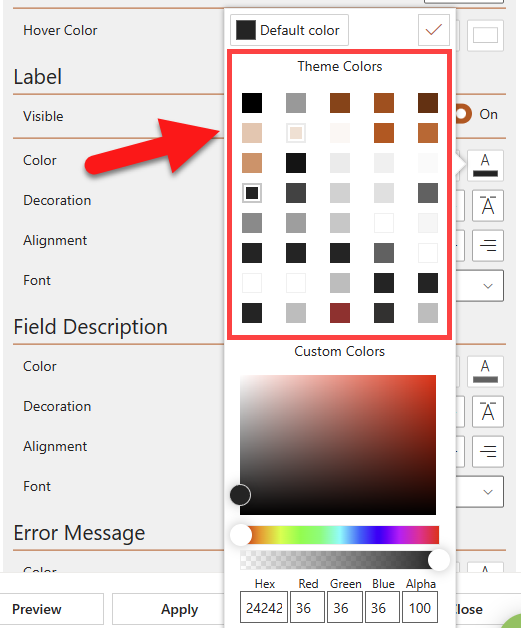 0
0 -
Hello Christof
I was talking about Themes that you can register for SharePoint Online (farm wide) to follow the corporate ID. These are available also on the sites where we develop with skybow Solution Studio, however, it seems we can't access these via the styling options, so we thought in first instance...
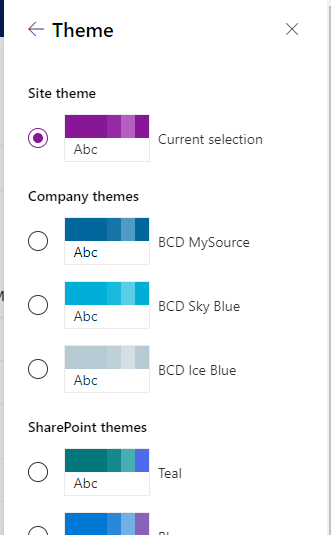
as the CSS under styling was written like this:
.sb-tab-item {
border-color: "[theme: themeDark]";
}we could apply something like this
.sb-tab-item {
border-color: "[theme: BCD Sky Blue]";
}but that didn't work :)
But as you said, if applying the theme to the site the color picker is showing the colors from our internal theme.
Cheers and thanks a lot again!Joerg
0 -
Exactly - the approach is to apply the Theme manually and use the color palette in Styling of Modern Forms.
If the color palette changed when another Theme was applied - the colors on the Forms change automatically to the new ones since the colors are referenced by the color palette keys.
Happy to help!
BR Christof0
Please sign in to leave a comment.
Comments
6 comments