How to retrieve and pass-through itemid from sublist

Dear all,
Currently I am struggling to find a way to call an edit form from a sublist from the main form.
On the mainform I have a sublist with items. I would like to call the customized edit form, but I cannot get the itemid of the selected item in the sublist.
Does anyone have a good solution/trick to get the itemid and pass it through as paramter to the editform of the sublist?
thanks in advance,
Jelle
-

Do you use the the ootb listview-rendering or grid-rendering for the sublist?
If you use the ootb listview-rendering (as described here: https://my.skybow.com/hc/en-us/community/posts/360007690020-Forms-Question ms-Question ) you could just show the ootb "Edit (link to edit item)" column in listview.
Result:
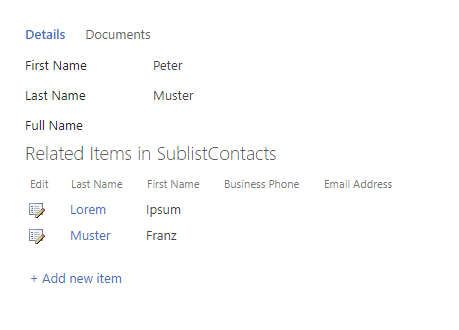
If you use the grid-rendering this column isn't working unfortunately and you have to create a new field in which you calculate an url. Just use a Template expression and concatenate YourURLToEditForm?ID=[[ID]].
Btw I believe user has to hold CTRL button while clicking links in grid views.
Please let me know if it helps.
0 -
Hi Cristoph,
Thanks for your reply.
I am indeed using the OOTB listview on my form.
I am able to create linked items with a button calling the newform of the sublist, I also do have the edititem option in the listview available, but that is just the issue I am struggling with.
For now, I am looking for an option to call the editform via a button so I can pass through some parameters.I will try your suggestion to add an calculated url in my listview.
First thing to solve for me is when calling an edit form of the sublist I want to redirect after save/cancel to the parentform. how to achieve this?
I need to know on the editform of the sublist from where/who is the initiator of this request (parent form in my case).
any ideas/suggestions would be great.0 -
You have two options to achieve this:
1. Add an "Open List Form" action to your save button on your sublist's editform. Described here: How to redirect to the new item after saving (instead of getting the same item just use the ID of your lookup field for the property "List item Id" like [[YourLookupToParent.ID]])
2. Pass the url of the parent item (like {yourSite}/Lists/YourParentList/DispForm.aspx?ID=1) in the "Source" parameter when you open the sublist editform. SharePoint navigates to this source url after saving the sublist item. The url to open sublists editform will then look like this: {yourSite}/Lists/YourSubList/EditForm.aspx?ID=1&Source={yourSite}%2FLists%2FYourParentList%2FDispForm%2Easpx%3FID%3D1
0 -
I tried you suggestion, but I cannot select the attribute "ID" from my lookup field, I only have the ability to select the attributes Key, Value, Original Value and is Changed.
I expected that the "Key"-attribute should work as reference to the parent (lookup). But the results seems to be 0 (see tested evaluation below).
Also value returns an empty string.

But, changing the lookup field to show me the linked ID instead of another value. With this configuration I am able to use Original Value as reference-Identifier (ID) to my parent list.
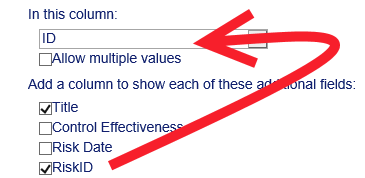
(Instead of RiskId I have now selected ID as the 'reference')
0 -
Please check which version of Rich Forms you're using. There is a fix in latest version skybow Rich Forms Full Trust 3.1.27.7 for this issue you're describing:
SP 2013: Expresison Builder: Fields from lookup source list are not loaded, when source list has Number field. Fixed issue when user has list with number field and sublist. And on sublist's Expression Builder fields are not loading correctly through the lookup. (Bug 55123)
Please try it out with this updated version.
0
Please sign in to leave a comment.
Comments
5 comments