Adding attachments to sublist items

Hi everyone
I have a form that will be used to record items ordered, which are contained in a related sublist (a screenshot of my form is shown below):
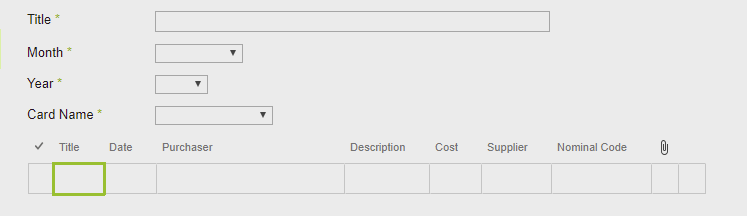
One of the requirements is that a scanned copy of a receipt is attached to each item in the sublist. I understand that this isn't possible using the datasheet/quick edit view of a list which seems to be the default view type when a sublist control is added to the form as above.
Is there a way where I can change the list view of the sublist to a standard SharePoint list view as I assume I can then access the form for the sublist and add attachments that way? Other than that is there an easy way that anyone knows of to add atachments to individual items in a sublist?
Thanks for your help in advance.
-

Hi Gareth Jayne
Have a look to my last comment in this discussion where I shortly described how you can add a sublist as standard list view (not grid view):Forms Question
Therefore you can use the standard "Edit" column to open subitems edit forms.
In other expenses solution we use a sublibrary instead a sublist for the receipts. This way it's required to upload the document first and set all the receipt metdata directly on the receipt (document).
Let us know if this helps.
0 -
Thanks Christof. If possible i also want to total all the cost fields in the sublist/sublibrary for the individual items as a Total Expenditure field on the main form. Is this possible as if I add a sublibrary or use the OOTB SharePoint webpart as detailed in the post you've mentioned I don't seem to get sublist fields available in the expression builder as I would if i added the sublist in the usual way?
0 -
Hi Gareth Jayne
You're right: The functionality of sublist calculations is not available with SP ootb List View Webpart inside Rich Forms. You have to use "Insert sublist" grid view if you want calculate with sublist's values.
If you're using the Rich Forms Add-In in SP Online, have a look at our Solution Studio that includes full Rich Forms functionality and much more - in your case: calculations of sublists in background instead on the form.
skybow Solution Studio Feature - Aggregation
Just contact us if you need more information in this topic.
0
Please sign in to leave a comment.
Comments
3 comments